Keywordme is a Chrome plugin that speeds up manual keyword work inside Google Ads: one-click blocking, match type application, no spreadsheet export. It starts around $12 per seat. SearchSavior is a live-account tool that recommends a match type for every negative, checks it against your active keywords before you block, scans daily, and estimates hidden waste. It starts at $49. If you want faster manual editing, Keywordme fits. If you want the blocking checked for safety and automated, SearchSavior fits.
Background
Keywordme is a Chrome extension that works inside the Google Ads interface. It sits on top of the Search Terms Report and lets you remove junk terms, add negatives, apply match types, and build keyword lists without exporting to a spreadsheet. The pitch is speed: you are already in the report, so you act on it in place, one click at a time.
SearchSavior takes a different path. It connects to your Google Ads account through the API and reads the whole picture: your search terms, your active positive keywords, your existing negatives across every campaign. It uses AI (Gemini 2.5 Flash) to classify each term, recommends the right match type, and checks every proposed negative against your active keywords before anything goes live. It also runs on its own each day, so the review happens whether you open the account or not.
The Key Difference: Speed vs Safety
Keywordme is built for speed. You are inside the Search Terms Report, you spot a junk query, you click, it becomes a negative. No export, no spreadsheet, no tab-switching. For clearing obvious rubbish quickly, that workflow is genuinely good.
SearchSavior is built for safety. Before any negative goes live, it checks the term against every active positive keyword in your account and tells you whether the block would also hit something profitable. It recommends the match type for each term rather than leaving that call to you, and it keeps every action reversible. The blocking is slower by a second or two, because a check runs first. That check is the point.
Why the match type is where the danger lives: Adding "salary" as an exact negative blocks only the query "salary." Adding it as a phrase negative blocks every query containing the word: "product manager salary," "salary expectations," and also "salary benchmarking software" if that happens to be what you sell. A speed tool applies whichever match type you pick in one click. It does not warn you when that click is about to switch off a keyword you are paying for. That warning is the whole difference.
Feature Comparison
| Feature | Keywordme | SearchSavior |
|---|---|---|
| Where it runs | Chrome plugin, inside Google Ads | Connected web app, reads your live account |
| Speed of in-interface editing | Very fast. One-click inside the report | Fast, but a conflict check runs first |
| Conflict detection before blocking | No | Yes. Checks every active positive keyword first |
| Per-term match type recommendation | No. You choose the match type | Yes. Exact, Phrase, or Broad with reasoning |
| Hidden waste estimation | No | Yes. Estimates spend in redacted search terms |
| Daily automated scans | No. You run it manually in-session | Yes. Runs each day without you opening the account |
| Reversible changelog | No | Yes. Every block logged and one-click reversible |
| Build positive keyword lists | Yes. Fast list-building in-interface | No. Focused on negatives and waste |
| Bulk paste and match-type lists | Yes | Batch blocking with shared match type |
| Multi-account support | Yes. Team seats | Yes. Agency tier, up to 15 accounts |
| Free option | 7-day trial | Free CSV audit, plus 7-day trial |
| Starting price | ~$12 per seat / month | $49 / month |
Why "hidden waste estimation" matters
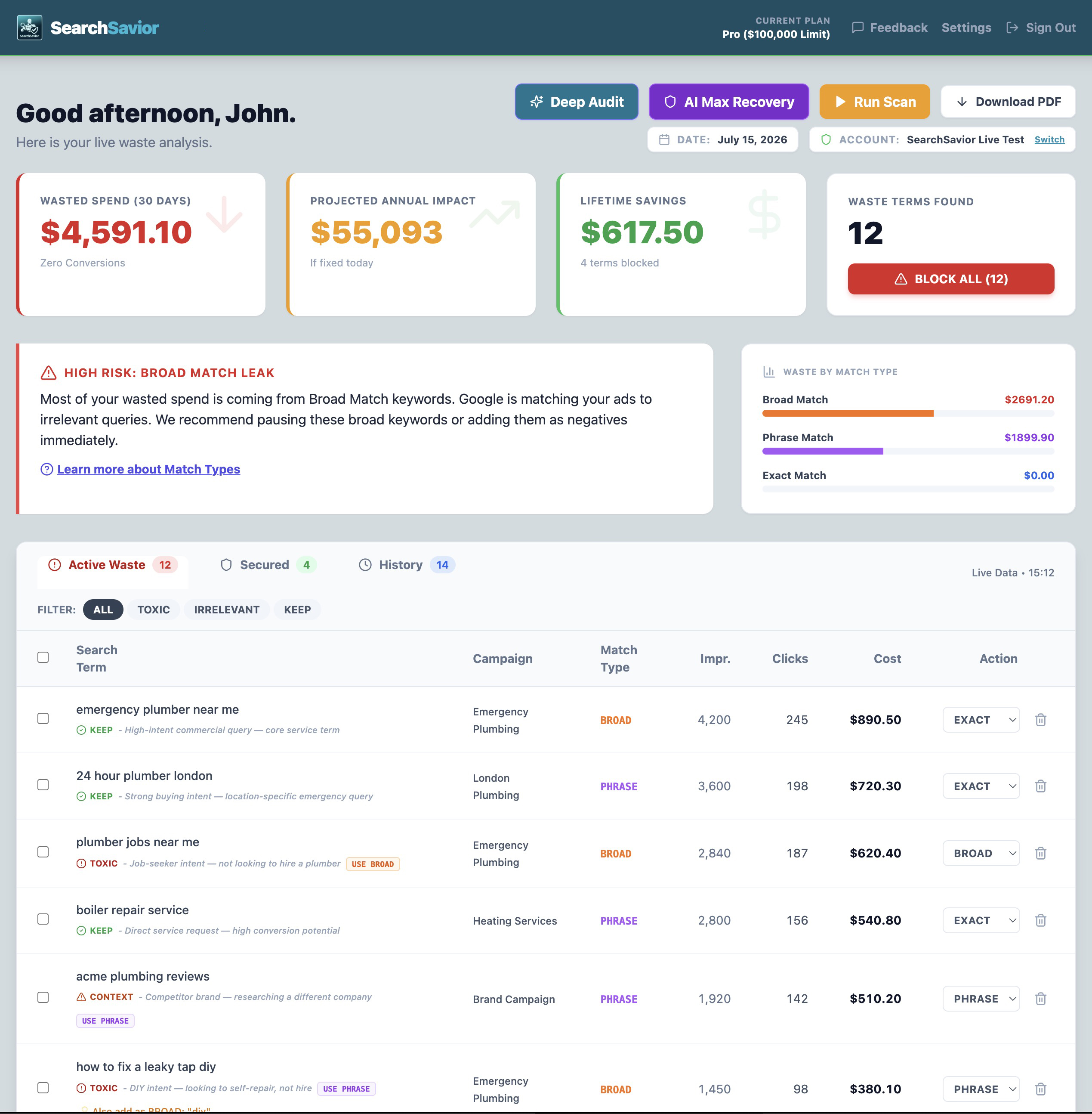
Google redacts 27 to 73% of your search term data, citing privacy. Those queries cost you real money but never appear in your reports. A plugin that works inside the Search Terms Report can only act on what the report shows, so the redacted portion stays invisible to Keywordme too. Independent research on 933 campaigns (Taikun Digital, 2025) found these hidden queries cost 51% more per click and convert at half the rate of visible ones.
SearchSavior estimates that hidden spend statistically, giving you a number for what share of your account is currently invisible to your reports. Because Keywordme reads only the visible report inside the Google Ads interface, it has no equivalent.
Where Keywordme Has the Advantage
Keywordme is genuinely good at the thing it is built for. If you spend real time inside the Search Terms Report and your main frustration is the friction of exporting to a spreadsheet and back, it removes that friction well. You highlight, you click, the negative is applied with the match type you chose. For clearing obvious junk fast, it is quick and pleasant to use.
It also builds positive keyword lists in the same motion, applies match types across a pasted list, and works across multiple accounts on team seats. At around $12 per seat, it is priced for individual contributors and small teams who want a lightweight speed boost with no onboarding. If your workflow is "I am already in Google Ads and I just want to act on this report faster," Keywordme is a sensible, affordable choice, and cheaper than SearchSavior.
The trade-off is that speed is all it offers. It makes manual work faster without checking that work for safety, and it acts only on the visible report rather than reading your whole account.
Where SearchSavior Has the Advantage
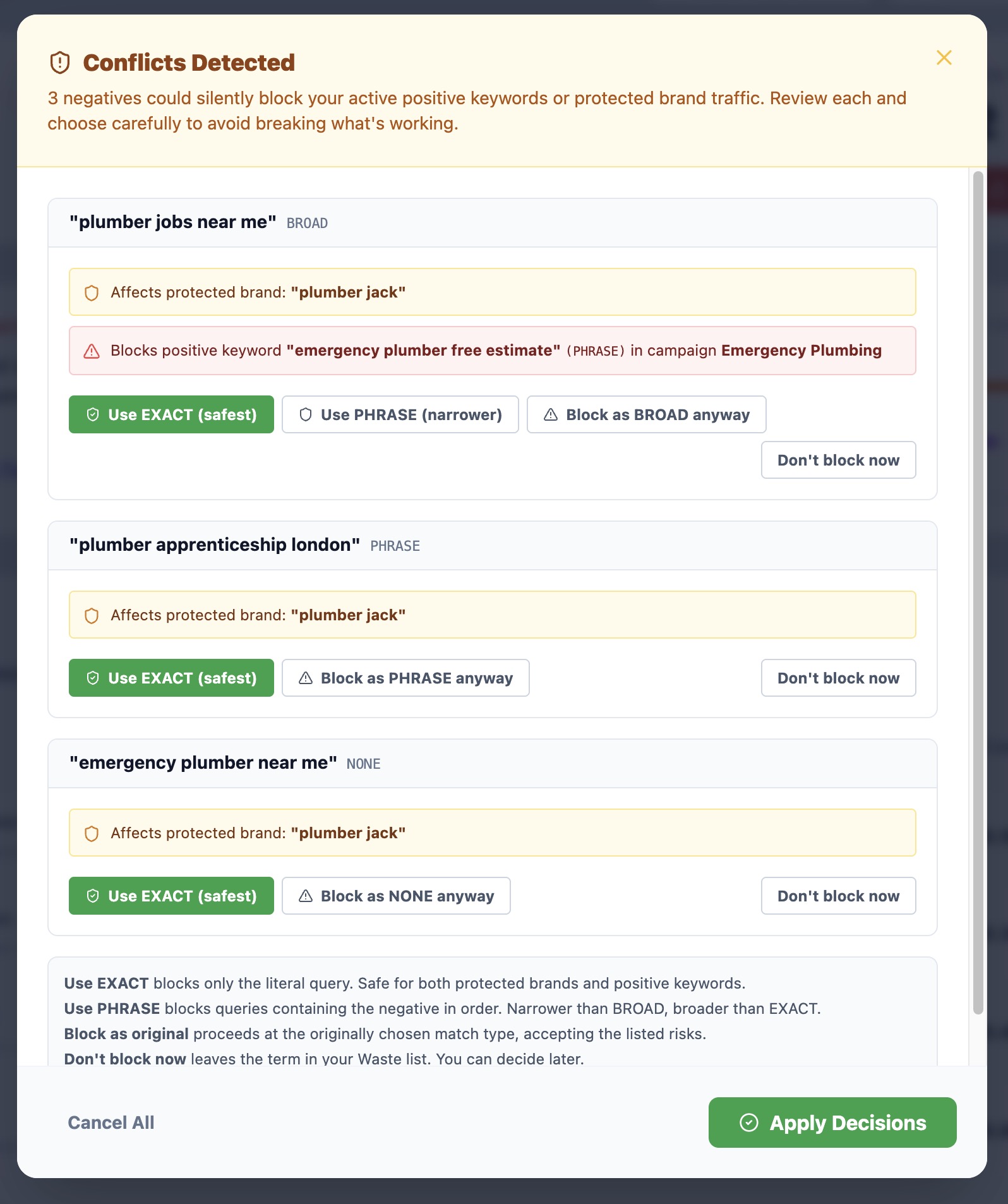
SearchSavior does less than a full plugin workflow, and more on the one thing that carries real risk: blocking safely. The differences that matter most:
- Conflict detection before every block: SearchSavior checks each proposed negative against every active positive keyword across every campaign, then warns you if the block would hit something profitable. Keywordme applies the negative you chose in one click, with no such check. This is the single biggest difference between the two tools, and the reason agencies trust SearchSavior to let junior staff manage client negatives without wiping out traffic.
- Match type recommendations: Every flagged term comes with a suggested match type and a reason. Keywordme lets you apply Exact, Phrase, or Broad quickly, but the choice of which is yours to get right. SearchSavior makes the call and explains it.
- Daily automated scans: SearchSavior runs every morning and surfaces new waste before it compounds. Keywordme only acts when you open the report and work through it by hand, so waste that appears between sessions goes unaddressed.
- Hidden waste and reversible history: SearchSavior estimates the spend in the search terms Google redacts, and logs every block so you can reverse it in one click. Keywordme, working inside the visible report, offers neither.
One factor is worth weighing in 2026: Google's push toward AI Max and broader match types means negatives work across wider patterns, which raises the risk of collateral damage on every block. A tool that makes blocking faster without checking it first amplifies that risk. A tool that checks every block against your live keywords reduces it. That gap widens as Google leans harder on broad matching.
Who Should Choose Which?
Choose Keywordme if:
- You spend a lot of time in the Search Terms Report and want to act on it faster
- Your priority is speed and low cost, and you are confident choosing match types yourself
- You want to build positive keyword lists in the same in-interface motion
- You are comfortable checking for keyword conflicts manually before you block
Choose SearchSavior if:
- You want every negative checked against your active keywords before it goes live
- You want the match type recommended for each term, with reasoning
- You want the review to run daily on its own, not only when you open the account
- You want hidden waste estimated and every block reversible in one click
- You are an agency and cannot afford a junior wiping out a client's profitable traffic
Frequently Asked Questions
Is SearchSavior or Keywordme better for negative keywords?
They solve different problems. Keywordme is a Chrome plugin that makes editing keywords inside the Google Ads Search Terms Report faster: one-click blocking, match type application, no spreadsheet export. SearchSavior is a live-account tool that recommends a match type per term, checks every proposed negative against your active positive keywords before you block, runs daily scans, and estimates hidden waste. Keywordme suits advertisers who want faster manual editing; SearchSavior suits those who want the blocking checked for safety and automated.
Does Keywordme check for keyword conflicts before blocking?
No. Keywordme speeds up adding negatives inside the Google Ads interface, but it does not check whether a negative you are about to add would also block one of your active, profitable keywords in another campaign. SearchSavior runs that cross-campaign conflict check before every block, which is what stops a broad or phrase negative from quietly cutting traffic you are paying for.
Keywordme is cheaper. Why choose SearchSavior?
Keywordme starts at around $12 per seat per month; SearchSavior starts at $49. The gap reflects a difference in category. Keywordme is a speed plugin that makes your manual editing faster. SearchSavior reads your whole account, recommends match types, checks for conflicts before blocking, scans daily, and keeps a reversible changelog. If you want faster clicking, Keywordme is the cheaper choice. If you want the blocking checked and automated so a single negative never costs you a profitable keyword, SearchSavior earns the difference.
Can I use SearchSavior alongside Keywordme?
Yes. Some advertisers use Keywordme for fast in-interface edits and SearchSavior for the daily automated scan, conflict checking, and hidden waste estimates. You can try SearchSavior first with a free 30-day search terms CSV audit, no account connection needed, or a 7-day Pro trial with no credit card.
See What SearchSavior Finds in Your Account
Upload a 30-day search terms CSV for a free waste audit. No account connection required. Data deleted after analysis.
Get Your Free Waste Audit