Karooya and SearchSavior both cut wasted Google Ads spend, but they work differently. Karooya leads on n-gram analysis and a generous free tier. SearchSavior recommends the right match type for every negative and checks it against your active keywords before you block, so a negative never quietly kills a profitable keyword. If you want conflict-safe blocking and hidden-waste estimates, SearchSavior fits. If you want free n-gram reporting, Karooya fits.
Background
Karooya has been in the Google Ads management tools space for years, offering a suite that includes negative keyword discovery, ad scheduling, and quality score tracking. Its negative keyword feature uses N-gram analysis to surface patterns in search term data and suggest potential negatives.
SearchSavior is a focused, single-purpose tool: find wasted spend in Google Ads search terms and help you block it with intelligent match type control. It uses AI (Gemini 2.5 Flash) to classify each term and recommend the optimal negative match type.
The Key Difference: Approach to Match Types
Karooya's N-gram approach is useful for spotting recurring word patterns across your search terms. It might surface that "salary" appears in 47 wasted queries, prompting you to add it as a negative. But it does not recommend what match type to use for that negative. The decision is left entirely to the user.
SearchSavior analyzes each flagged term individually and recommends Exact, Phrase, or Broad match with a specific reason. It also checks your positive keywords before blocking, so you know whether a phrase or broad negative would accidentally block traffic you actually want.
Why match type matters more than the keyword itself: Adding "salary" as an exact match negative only blocks the query "salary." Adding it as a phrase match negative blocks every query containing "salary": "product manager salary," "average product manager salary uk," "salary expectations product manager." One decision, dozens of wasted queries eliminated permanently.
Feature Comparison
| Feature | Karooya | SearchSavior |
|---|---|---|
| Analysis method | N-gram pattern analysis | AI intent classification (Gemini 2.5 Flash) |
| Per-term match type recommendation | No. User selects | Yes. Exact, Phrase, or Broad with reasoning |
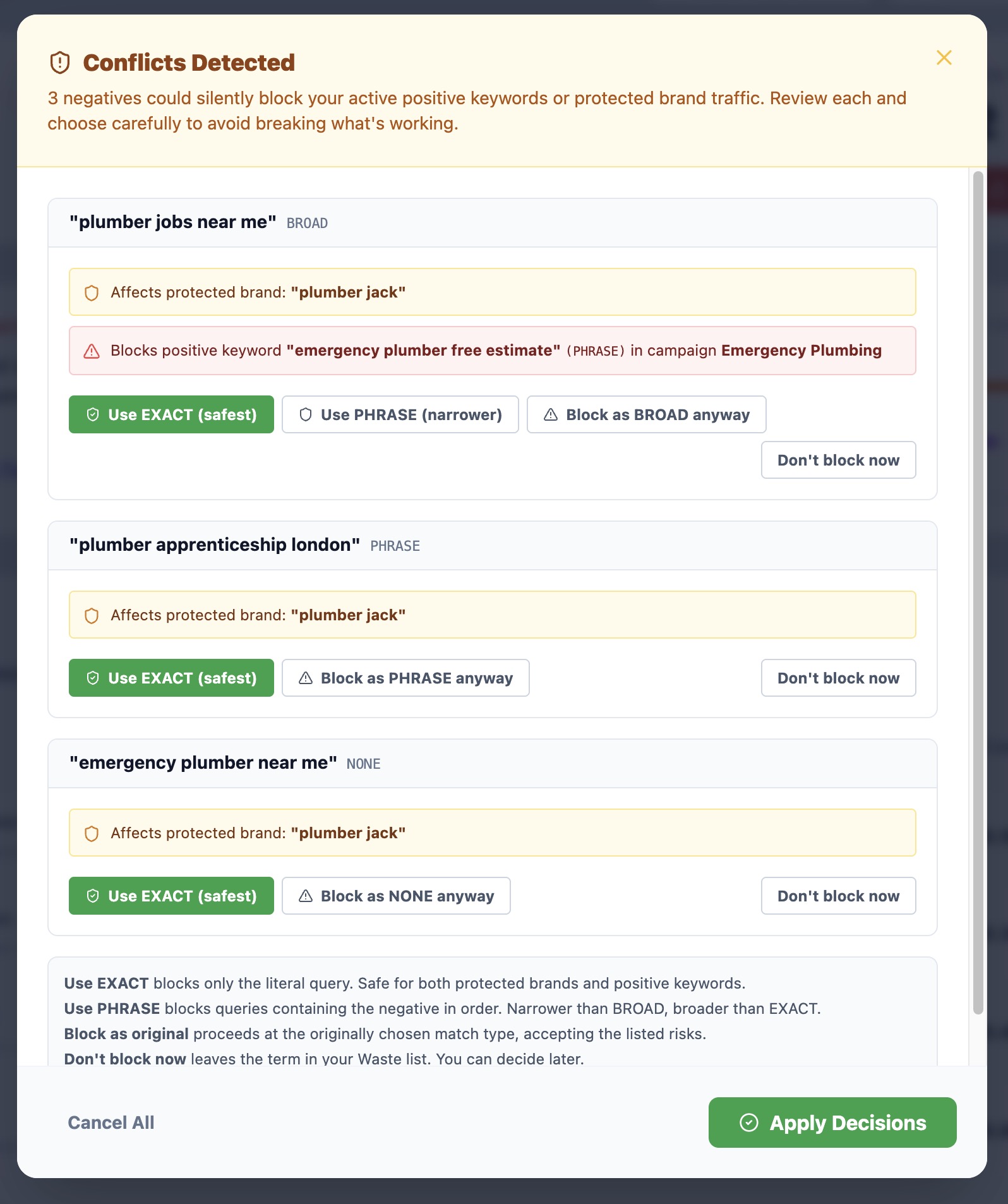
| Conflict detection | No | Yes. Warns before blocking your positive keywords |
| Hidden waste estimation | No | Yes. Estimates waste in hidden search term data |
| Custom instructions | No | Yes. Business rules applied to every scan |
| Landing page crawl | No | Yes. Uses your website content for relevance decisions |
| One-click blocking to Google Ads | Yes. Pushes to campaigns, ad groups and shared lists | Yes. Pushes directly via API |
| Reversible blocking | Yes. Undo on add, and removal from the account | Yes. One-click unblock removes from Google Ads |
| Savings tracking | No | Yes. Lifetime savings on dashboard |
| Scan frequency | Monthly reports (free tier) | Daily automated scans |
| Other tools included | Ad scheduling, quality score, account audit | Focused on negative keywords only |
| Free tier | Yes (up to $10K spend) | Yes (free CSV audit) |
| Pricing (paid) | $49–$500/mo | $49–$299/mo |
Why "hidden waste estimation" matters
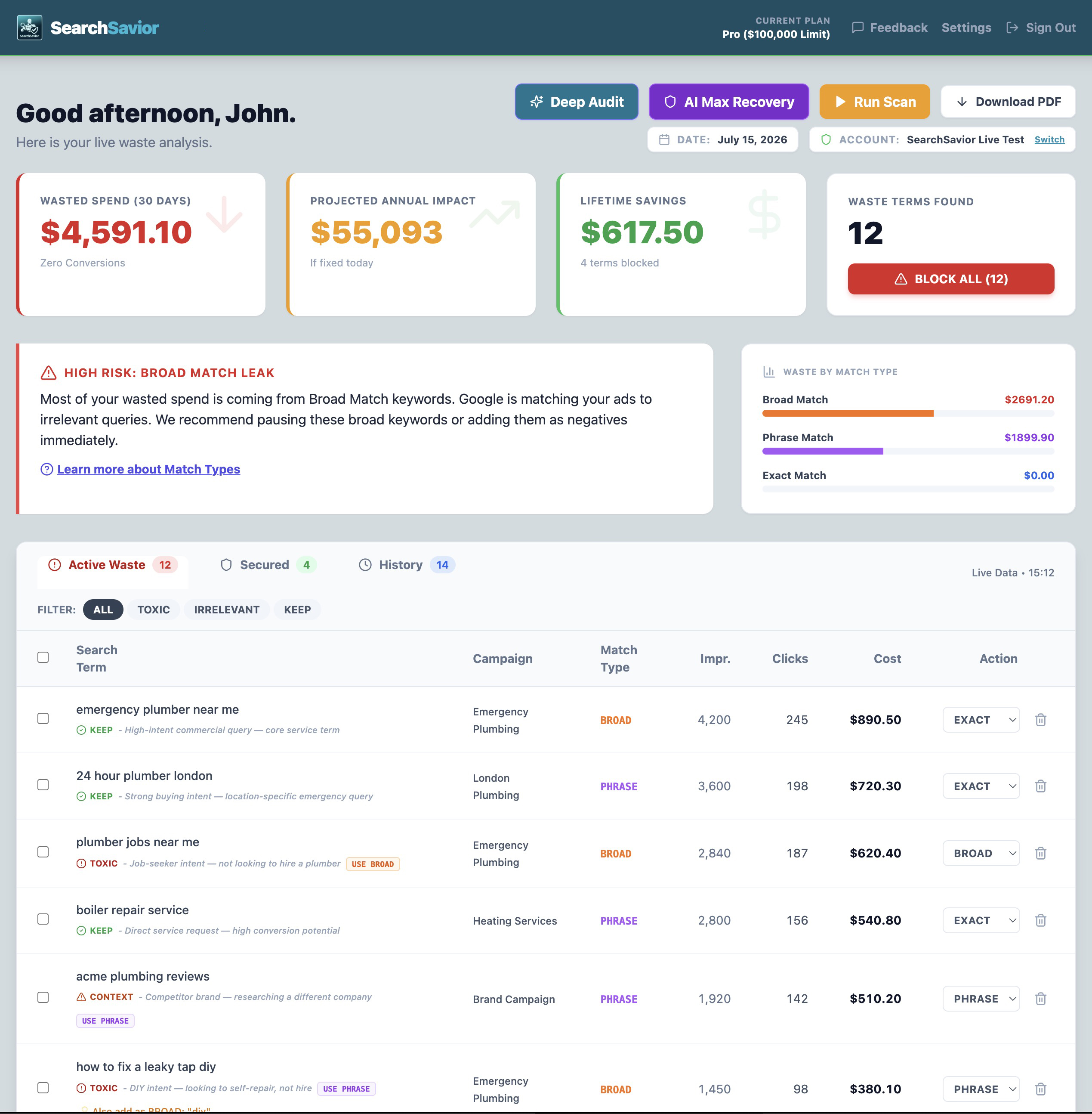
Google redacts 27 to 73% of your search term data, citing privacy. Those queries cost you real money but never appear in your reports, and they never make it into a Karooya N-gram analysis either, because Karooya can only pattern-match the visible portion. Independent research on 933 campaigns (Taikun Digital, 2025) found these hidden queries cost 51% more per click and convert at half the rate of visible ones.
SearchSavior estimates that hidden spend statistically, giving you a number for what share of your account is currently invisible to your reports. Karooya has no equivalent.
Where Karooya Has the Advantage
Karooya is a broader tool. If you want negative keyword discovery alongside ad scheduling analysis, quality score tracking, and account-level auditing in one platform, Karooya offers more scope. Its free tier for accounts under $10K monthly spend is also generous, which is useful for small advertisers who want basic negative keyword reports without paying.
The N-gram approach is also useful for high-volume accounts where pattern recognition across thousands of terms can surface systematic waste that individual term analysis might miss. Native N-gram analysis is on SearchSavior's near-term roadmap, but until then, Karooya has the lead on this specific capability.
Where SearchSavior Has the Advantage
SearchSavior is narrower in scope but deeper in execution on the one problem it solves. The differences that matter most:
- Match type intelligence: Every flagged term comes with a recommendation. You don't need to decide whether "salary" should be Exact, Phrase, or Broad. The AI tells you, with reasoning.
- Conflict detection (the Confidence Engine): Before you block anything, SearchSavior checks the proposed negative against every active positive keyword across every campaign. This is the feature that makes broader negatives safe to use, and the reason agencies trust it to let junior staff manage client negatives without accidentally wiping out profitable traffic.
- Daily scans vs monthly reports: SearchSavior scans every morning and alerts you to new waste before it compounds. Karooya's free tier runs monthly, by which point the damage is already done.
- The check that runs first: both tools push negatives to Google Ads with one click, and both let you undo. SearchSavior tests the proposed negative against your live keywords at all four levels before it lands, which is the part Karooya does not do.
- Landing page intelligence: The AI uses your actual website content to determine what's relevant to your business, instead of relying on a short keyword list.
One more factor worth weighing in 2026: Google's push toward AI Max and broader match types means negatives need to work harder across broader patterns, which raises the risk of collateral damage on every block. The Confidence Engine matters more in that environment than it ever has, and Karooya does not offer an equivalent safety net.
Who Should Choose Which?
Choose Karooya if:
- You want a multi-purpose Google Ads management suite, not just negative keywords
- You spend less than $10K/month and want a free negative keyword report
- You prefer N-gram pattern analysis and are comfortable choosing match types yourself
Choose SearchSavior if:
- You want the AI to recommend match types, not just flag bad terms
- You want conflict detection so you can safely use phrase and broad negatives
- You need daily scanning, not monthly reports
- You want one-click blocking that pushes directly to Google Ads
- You want to encode business-specific rules that the AI applies on every scan
Frequently Asked Questions
Is SearchSavior or Karooya better for negative keyword management?
It depends on what you need. Karooya is a broader Google Ads suite with a generous free tier for accounts under $10K monthly spend. SearchSavior is narrower but deeper on negative keywords: it recommends a match type per term, checks for conflicts before blocking, runs daily scans, and estimates hidden waste. Heavy negative keyword users tend to prefer SearchSavior; teams wanting an all-in-one management suite lean toward Karooya. For the wider field, see our Karooya alternatives roundup.
What does SearchSavior do that Karooya doesn't?
Per-term match type recommendations with reasoning, conflict detection against active positive keywords before blocking, hidden waste estimation, daily automated scans, one-click reversible blocking through the Google Ads API, and custom business rules applied on every scan. Karooya leaves the match type decision to you and has no conflict check.
Does Karooya have conflict detection?
No. Karooya surfaces wasted terms with N-gram analysis but doesn't check a proposed negative against your active positive keywords. SearchSavior's Confidence Engine runs that check before any block, which is what makes phrase and broad negatives safe to use without cutting profitable traffic.
Can I try SearchSavior before switching from Karooya?
Yes. You can upload a 30-day search terms CSV for a free waste audit with no account connection required, or start a 7-day Pro trial with no credit card. The audit shows you what SearchSavior flags in your own data before you commit to switching.
See What SearchSavior Finds in Your Account
Upload a 30-day search terms CSV for a free waste audit. No account connection required. Data deleted after analysis.
Get Your Free Waste Audit