Negative keywords live at four levels: account level, shared negative lists, campaign level, and ad group level. Higher levels save admin and multiply risk, because the exclusion is compared against every keyword it reaches. Put universally irrelevant terms high, keep anything that could appear inside a converting query low and Exact, and check a term against your active keywords before applying it above ad group level.
The Four Places a Negative Keyword Can Live
Most advice about negative keywords stops at which terms to block. The question of where to put them gets far less attention, and it matters more, because the same word can be harmless in one place and expensive in another.
Here are the four levels, from widest reach to narrowest.
Account-level negative keywords
Added once in your account settings and applied across eligible campaigns without you attaching them anywhere. Convenient for terms that are wrong for your business in every context. This is the widest reach available, so it carries the most risk from a single mistake.
Shared negative keyword lists
Created in the shared library and applied to selected campaigns. One list, maintained in one place, reused wherever you choose. The reach is yours to control, which makes this the most useful level for anything that applies to a group of campaigns rather than all of them.
Campaign-level negative keywords
Applied inside a single campaign. Good for terms that are irrelevant to that campaign's offer but might be perfectly valid elsewhere in the account. Job-seeking queries in a lead generation campaign are a typical example.
Ad group-level negative keywords
The narrowest option, and the one used for steering rather than blocking. If you have separated close variants into their own ad groups, ad group negatives keep each query landing where you intended instead of being absorbed by a neighbouring ad group.
Why the Level Matters More Than the Keyword
A negative keyword beats a positive keyword. If the two overlap, the query stops matching and the traffic stops. That rule is the same at every level. What changes with the level is how many of your own keywords the negative is being compared against.
At ad group level, a negative can only collide with the keywords in that ad group. You can usually hold those in your head. At account level, the same negative is now sitting alongside every active keyword you run, including ones in campaigns you have not opened in weeks, and ones somebody else added while you were working on something different.
Consider the word "free" in an account that sells accounting software. In an ad group targeting paid plans, blocking "free" as a phrase negative is sensible: it stops freebie-hunters landing on a pricing page. Promote that same negative to account level, and it now reaches a lead generation campaign in the same account that bids on "free consultation" and "free setup call". Those queries stop matching. Nothing in the interface tells you.
The combination to watch: broad match negative at account level. Broad negatives block any query containing all of the words in any order, and account level applies that everywhere. It is the widest possible exclusion attached to the widest possible reach, and it is the single most common way advertisers switch off traffic they meant to keep.
The Shared List Problem
Shared negative lists are standard practice for good reasons. One list, maintained in one place, applied consistently across the campaigns that need it. Agencies build them per client, per vertical, per campaign type. They save real time.
The failure mode is drift. A list gets built for one campaign type, then attached to campaigns it was never designed for, because attaching it is a two-click job and nobody re-reads 400 lines to check. Lists get inherited from a previous manager along with the account. Terms get added during a busy afternoon and never reviewed again.
By the time an account has been running for a couple of years, the negative list is usually the least understood object in it. Everyone knows it exists. Very few people know exactly what is in it, at what match type, or which campaigns it currently touches.
Two habits help. Keep separate lists for separate purposes rather than one growing catch-all, so the reach of each stays legible. And when you attach an existing list to a new campaign, treat that as adding every term on it to that campaign at once, because that is what you are doing.
How to Decide Which Level
A working rule: the broader the match type, the narrower the level should be. Reach and match type multiply each other, so it is fine to have one of them wide as long as the other is tight.
Beyond that, sort by whether the term could ever appear inside a query you want.
- Account level: terms that can never be part of a valid query for your business, in any campaign you run now or add later. Job and career queries for most advertisers, obvious wrong-industry terms, adult terms. Keep this list short and keep it Exact or Phrase.
- Shared lists: terms irrelevant to a defined group of campaigns. This is where most of your negatives belong, because you control which campaigns inherit them.
- Campaign level: terms tied to that campaign's specific offer, geography, or funnel stage.
- Ad group level: steering between close variants, and anything you are genuinely unsure about. If you cannot say with confidence that a term never appears in a converting query, this is where it goes.
One more test worth applying before anything goes above campaign level: read the term as a fragment rather than a whole query. "Cheap" is not just "cheap". It is also "cheapest way to file corporation tax", which might be one of your better performing search terms. Fragments are how phrase and broad negatives actually behave, and thinking in whole queries is what makes an exclusion look safer than it is.
Checking a Negative Before You Apply It
The check itself is simple to describe. For each negative you are about to add, compare it against every active positive keyword within its reach, using the matching rules for the negative's match type, and flag any overlap.
Doing it by hand looks like this:
- Export all active keywords across every campaign the negative will reach, with their match types.
- For each proposed negative, work through the list. For an exact negative, look for an identical keyword. For a phrase negative, look for any keyword containing that phrase in order. For a broad negative, look for any keyword containing all of those words in any order.
- Flag every overlap, then decide whether to narrow the match type, narrow the level, or drop the term.
For an account with a few hundred keywords, that is an afternoon, and it needs repeating every time the list changes. Which is why it tends to happen for the big scheduled cleanups and get skipped for the one-off block on a Tuesday. The one-off block on a Tuesday is where most of the damage comes from.
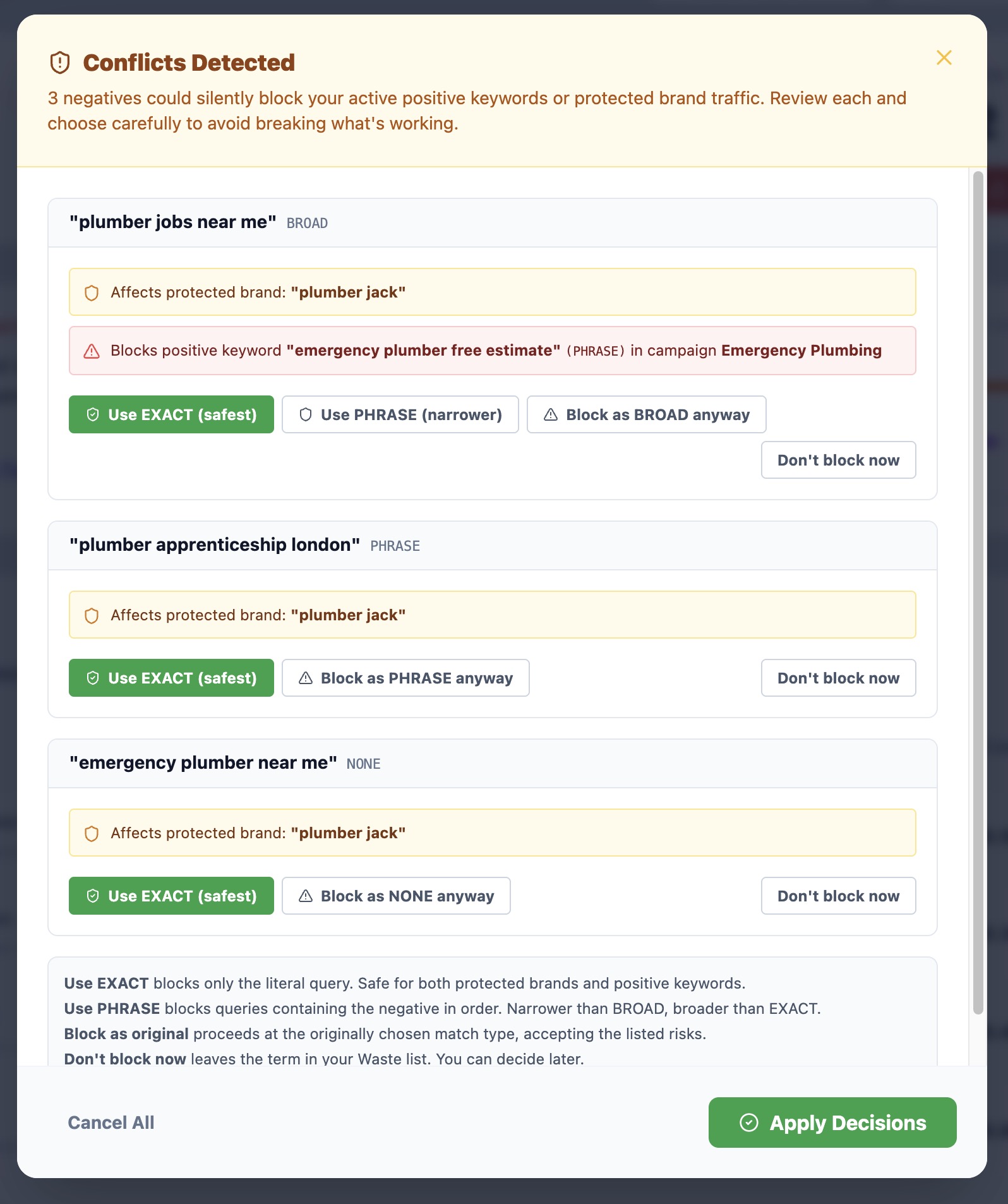
The automated version: SearchSavior runs that comparison before every block. It scans every active positive keyword across every campaign, and if the negative you are about to add would hit one of them, it shows you the keyword, its match type, and the campaign, then offers a narrower match type instead. Every block is logged and reversible in one click, so a decision made on a Tuesday can be undone on a Thursday without archaeology.
The Short Version
Negative keywords are the most direct control you still have over where your budget goes, and the level you apply them at is most of the risk. Terms that can never appear in a query you want can sit high. Everything else belongs lower and tighter than feels necessary at the time.
Before any negative goes above ad group level, the question worth answering is not whether the term is junk. It is which of your own keywords contain it.
Frequently Asked Questions
What is an account-level negative keyword in Google Ads?
An account-level negative keyword is applied once in your account settings and excludes that term from eligible campaigns across the whole account. It saves you adding the same exclusion to every campaign individually. Because it reaches everything, it should only hold terms that can never appear inside a query you want, in any campaign you run now or add later.
Should negative keywords go at campaign level or ad group level?
Campaign level suits terms that are irrelevant to everything in that campaign, such as job-seeking queries for a lead generation campaign. Ad group level suits terms you want to steer between ad groups rather than block outright, which is common when you separate close variants into their own ad groups. The narrower the level, the fewer keywords the negative can collide with, so anything you are unsure about belongs lower down.
Can an account-level negative keyword block my own keywords?
Yes. A negative keyword takes precedence over a positive keyword, so if the two overlap, the query stops matching and the traffic stops. Google Ads gives no alert when this happens. At account level the risk is highest, because the negative is compared against every active keyword in the account, including ones in campaigns you have not opened recently.
What is the difference between a shared negative keyword list and an account-level negative keyword?
A shared negative keyword list lives in your shared library and applies to the campaigns you attach it to, so you choose the reach. An account-level negative keyword applies across the account without you selecting campaigns. Shared lists are more flexible and easier to audit, since you can see exactly which campaigns a list is attached to.
Check a Negative Before You Add It
Paste up to 10 search terms and see how SearchSavior classifies them, with match type recommendations and conflict warnings against your own keywords. Free, no signup required.
Analyze Your Search Terms: Free